
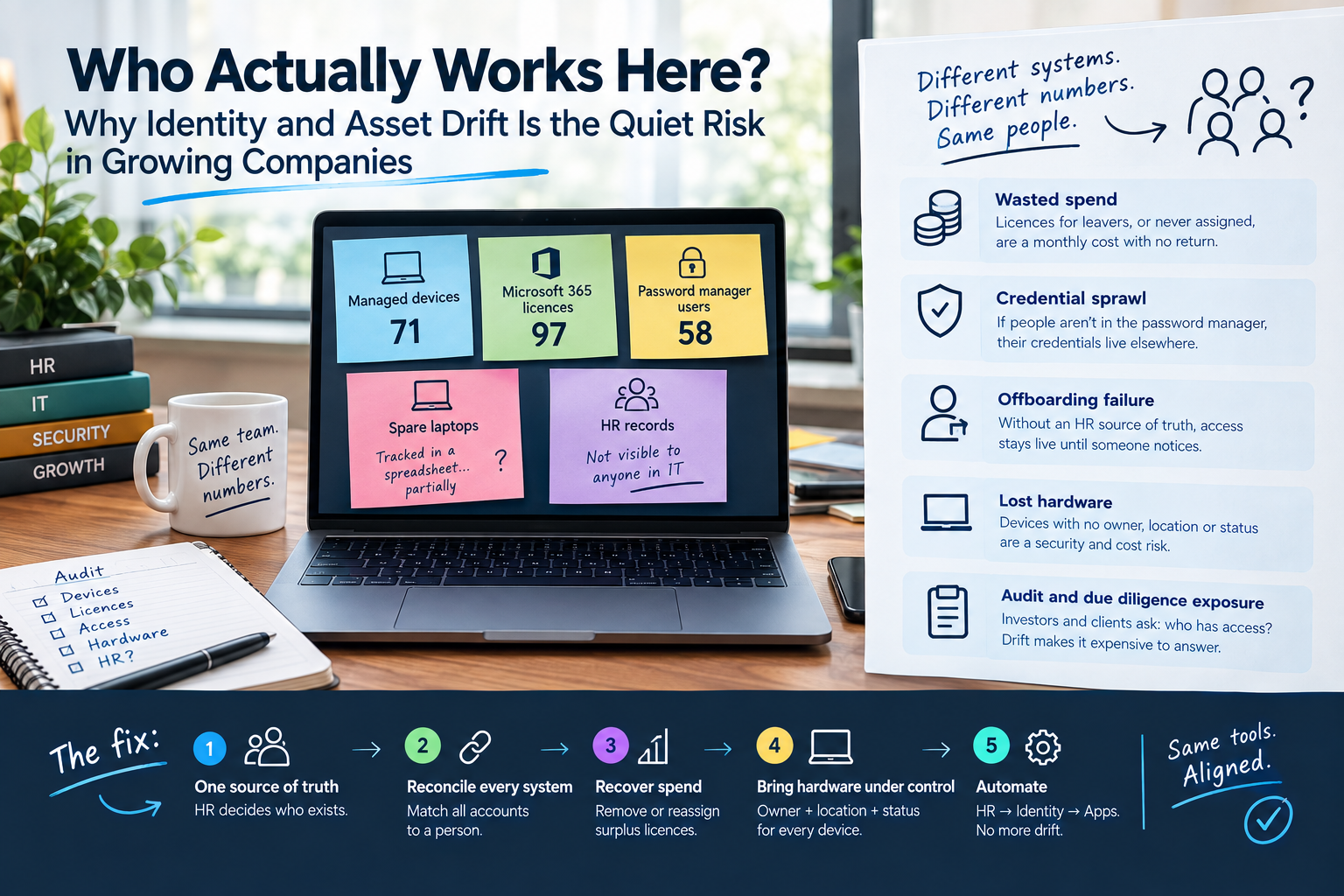
Ask a growing company a simple question: how many people work here?
You’d expect one answer. In most audits I run, I get four or five.
On a recent user access audit for a company of around 80 people, every system told a different story:
- Managed devices: 71
- Microsoft 365 licences: 97
- Password manager users: 58
- Spare laptops: tracked in a spreadsheet, partially
- HR records: not visible to anyone in IT
None of these numbers is dramatic on its own. Together, they show a company that no longer has a reliable answer to who has access to what.
That’s identity drift. And it’s far more common than a breach.
How drift happens
Nobody sets out to build a messy environment.
A tool gets bought to solve a problem. Someone creates the accounts. A contractor joins for three months. A laptop comes back from a leaver and goes in a drawer. Each decision makes sense at the time.
The problem is that each system gets managed on its own, by whoever needed it that week. Over time, they stop agreeing with each other.
I’ve seen this pattern at every stage of growth. When I joined Tide as employee 39, I built the IT infrastructure from scratch and scaled it across Sofia, London and Hyderabad to more than 1,000 people. The companies that stay in control aren’t the ones with the most tools. They’re the ones where every tool follows the same source of truth.
What the gaps actually cost
Wasted spend. Licences assigned to leavers, or bought and never assigned, are a monthly cost with no return. At 20 or more surplus licences, this adds up fast.
Credential sprawl. If a quarter of staff aren’t in the password manager, their credentials live somewhere else. Browser storage, notes apps, shared documents. You can’t secure what you can’t see.
Offboarding failure. Without an HR source of truth, IT can’t confirm who has left. A leaver’s access stays live until someone happens to notice.
Lost hardware. Idle devices are the gap most companies miss. A laptop with no recorded owner, location or status might be wiped, reassigned, or still holding a former employee’s data. Nobody knows which.
Audit and due diligence exposure. Investors, enterprise clients and certifications like ISO 27001 or Cyber Essentials all ask the same question: show us who has access. Drift makes that question expensive to answer.
Not every number is a problem
Part of an audit is knowing what to ignore.
In the same review, the company’s chat platform showed over a hundred deactivated accounts. It looked alarming. It wasn’t. Deactivation is the standard offboarding process there, and deactivated users generally aren’t billed. The real check was whether the active accounts matched the staff list.
Good IT operations isn’t about finding as many issues as possible. It’s about finding the ones that matter, in the right order.
How to fix it properly
Cleaning up accounts once is easy. Keeping them clean is the actual job. This is the approach I use.
1. Establish one source of truth
The HR system decides who exists. Not the device count, not the licence count, not someone’s memory.
This means IT needs structured access to HR data: at minimum a regular staff export with employment type, start date and end date. Employees and freelancers need to be clearly separated, because their access should differ.
2. Reconcile every system against it
Every identity gets matched to a person:
- Identity provider (Entra ID, Okta, JumpCloud or Google Workspace)
- Email and collaboration (Microsoft 365 or Google Workspace)
- Password manager
- Chat and core SaaS tools
- Device management (Intune, Jamf, JumpCloud, Iru)
Anything without a matching person gets disabled first, not deleted. Deletion comes after the business confirms nobody needs it. This avoids breaking a process someone forgot to mention.
3. Recover spend and close access gaps
Surplus licences get removed or reassigned. Excess admin rights get cut back. Staff missing from the password manager get onboarded, with a clear policy on what belongs in it.
This phase usually pays for part of the project through licence savings alone.
4. Bring hardware under control
Every device, including the ones not in use, needs three things recorded: an owner, a location and a status (in use, spare, awaiting wipe, retired).
MDM covers active, enrolled devices. It doesn’t cover the laptop in a cupboard. A proper asset register, whether a dedicated ITAM tool like Snipe-IT or an asset module integrated with your MDM, closes that gap and replaces the spreadsheet.
5. Automate so it doesn’t drift back
The long-term fix is connecting the chain: HR system to identity provider, identity provider to apps.
Okta and JumpCloud integrate natively with common HR platforms, and Entra ID supports inbound provisioning from HR systems. Combined with SSO and SCIM provisioning to your core apps, onboarding and offboarding stop depending on someone remembering. A new hire gets access on day one. A leaver loses it on their last day.
The principle behind it
IT should follow the business, not exist for its own sake.
The goal isn’t more tools. Most companies already have the right ones. The goal is making them agree with each other, and with the reality of who works there.
I’ve spent more than 12 years building and fixing IT operations at companies like Tide, SpotMe and HEINEKEN, and now work with UK and EMEA companies as a fractional IT operations lead. The pattern is always the same: the gaps are quiet until they’re expensive.
Where to start
Try this: pick three systems and count the active users in each. Then compare them to your HR headcount.
If the numbers don’t match, you have drift.
If you want a clear view of where your gaps are and what to fix first, there’s a free 10-minute IT assessment at itops.zlefterov.com.